
PhoneFarm ReadMe
Note: This page is shared with Parakeet PhoneFarmer collaborators and is publically available.
What is PhoneFarm?
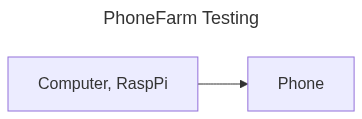
Sending out/ receiving SMS programmatically is expensive. PhoneFarm is a cheaper alternative, using smartphones with pre-paid sims to send out/ receive SMS programmatically for Studio Corsair's products.
Since PhoneFarms must be set up in the United States (since the phones will be using American Telecom providers), Studio Corsair is looking for PhoneFarmers, collaborators who will set up and maintain PhoneFarm hardware at their offices/ locations in exchange for a monthly payment of $200.
Conceptually, this is like mining crypto. A PhoneFarm is a Raspberry Pi Computer connected to a handful of smartphones with prepaid SIM cards and you get (mostly) passive income by keeping the farm running.
Studio Corsair Responsibilities
- All hardware (rasppi, phone, SIM cards, etc) and software expenses are the responsibility of Studio Corsair.
- After you have completed the Initial Setup for a farm, Studio Corsair Engineers will remotely access the Farm computer and set up the software for the Remote Setup.
- Studio Corsair will monitor the SMS capacity and uptime of the system.
PhoneFarmer Responsibilities
As the PhoneFarmer, you will have the following responsibilities:
Farmer Responsibilities
- Please reply to any business-related message within 24 hours.
- You must have the time to set up and maintain the farms.
- Set up the farm within 3 days of starting the program.
- Add new phones within 3 days of receiving them/ being asked to acquire a phone**.
- Repair/ Restart any hardware on the farm within 2 days. (Less than 1 day if it is an emergency, please).
- If you will be away from the farm for a while (if you're going on vacation or something), then please delegate someone who can fulfill your responsibilities until you return.
Electricity Requirements
You pay for the electricity to run the farm. However, the Bitcoin mining analogy falls apart here lol.
The estimated monthly electricity cost is low: ~$1 for the Test Farm and ~$12 for the Full Farm (mostly the UPS) (Source: ChatGPT4).
If a single farm's electricity costs ever go above $20 per month, Studio Corsair will re-reimburse you for anything above that.
We location that you run it in must have constant power. No rats nest wiring, no lights flickering, you should provide a power cable just for the phone farm. The Full Farm will have a UPS but we want to lean on the side of stability.
Internet Requirements
We need constant internet access, this cannot be a location where wifi/ internet drops sometimes. The RaspPi can be connected to your router via WiFi (or directly with an ethernet cable).
However, the internet bandwidth usage is very low, loading the main page of Reddit or your favorite social media website will probably use more bandwidth than PhoneFarm will in an entire day (if not an entire week lol), so you don't need to be concerned about it slowing down your other internet-connected devices.
Location Requirements
Once the farm is set up, it needs to run continuously since our customers will be using them to send SMS in/ out continuously.
Uptime and stability are paramount.
- Constant access, this must be a location that you will have access to for a long time.
- Protect the farm by putting it in a shoe box/ cardboard/ plastic box.
- Constant Cell Signal, same as the above.
- Close to T-Mobile (or alternative) Store, since you might need to pick up pre-paid SIMs in person.
- Convenient access for for you. This must be a location that you can access without needing a key from anyone else, ideally less than an hour away from your residence.
Initial Setup
Initial Setup must be performed once per farm. We estimate that it will take probably an hour (depending on how techsavvy you are). You will also need to use the terminal on the Raspberry Pi to enter a few commands to enable Remote Setup, so you should be comfortable enough with opening the terminal and entering commands.
Setup the Rasp Pi
- Install Raspberry Pi OS on the SD card, https://www.raspberrypi.com/software/
- Insert SD Card
- Power the Pi
- Connect the Pi to your router (connecting a mouse/keyboard/monitor and doing it that way is the easiest, but you can also enter wifi settings when you installed the OS above)
InstallOpenngrokthehttps://ngrok.com/Rasp Pi's terminal andruninstallatmate:
sudo toapt-get portinstall 22:tmate
https://ngrok.com/docs/using-ngrok-with/ssh/
Once installed, launch tmate with tmate. You should see something like ssh PMhmes4XeKQyBR2JtvnQt6BJw@nyc1.tmate.io (please provide us with the info it provides so we can connect to it to perform the Remote Setup where we install the server and other software needed on the Pi)
- Once Remote Setup is complete, you can continue with the Phone Setup.
Phone Setup
Phone Setup must be performed once per phone.
- Enable Developer Mode on phone.
- Purchase pre-paid (T-Mobile) SIM** and install it on the phone. If you purchase a pre-paid SIM card at the store, T-Mobile only asks for your name. Once we start to add a few devices to our farm, Studio Corsair will order SIM cards for you online (so you don't have to give your name to T-Mobile).
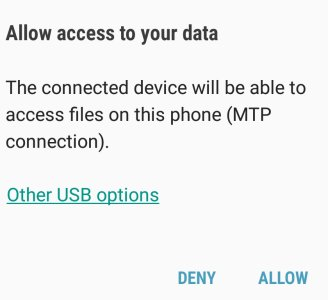
- Connected phone to RaspPi and allow the computer to access it (you might see a popup on your phone like the above).
Farm Growth
- As the SMS demands of the business grow, you will need to add new phones to the farm and possibly add new farms**.
- We estimate that with a USB switch, each farm can manage 5-10 phones.
Repairs/ Maintenance
- Replace any malfunctioning hardware at the farm**.
- Plug/ unplug or restart devices when needed.
- Replace SIM cards if there is an issue with them.
**Ideally, Studio Corsair will order these from the internet and have them shipped to you, but you might have to go to a store and purchase them. If you purchase them yourself, Studio Corsair will reimburse you for the purchase/ provide you with a corporate credit card (if possible).
Farm Hardware
Test Farm
The initial test farms will be composed of a RaspPi computer and a smartphone.
Once this proof of concept has been tested remotely by Studio Corsair staff over a few weeks (and we've ironed out any issues), we will scale out to a Full Farm.
The Test Farm will take up less space than a shoe box (and the box will be mostly empty). The hardware components (not including power cables) will take up the size of ~4 smartphones (since a RaspPi is the size of ~3 smartphones + the Phone itself).
Full Farm
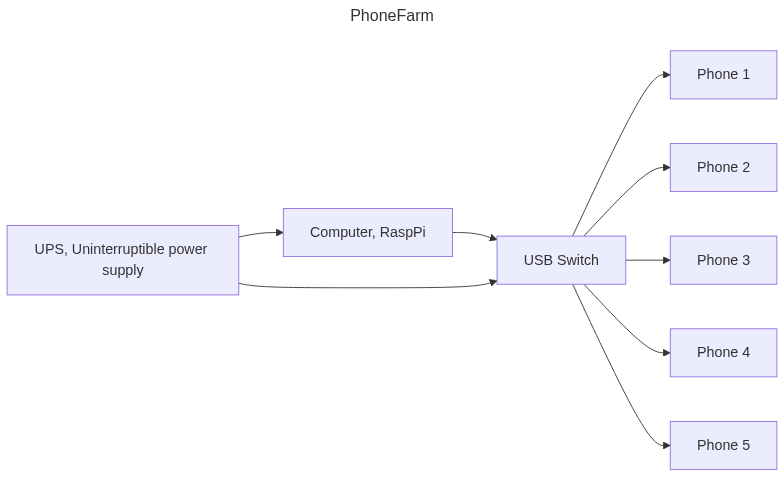
Each full farm will be composed of:
- Possibly a UPS, Uninterruptible power supply
- A Computer, RaspPi which runs our server that controls the USB switch, and communicates with the phones
- USB Switch to control which phone is connected to the computer
- Some Android (Lollipop or Later) phones (with pre-paid SIM cards). As the volume of SMS increases over time, more phones would be added to the farm (and more farms would be created).
We estimate that the Full Farm will take up 1 to 2 shoe boxes in size. It contains all the components in the TestFarm and adds a USB Switch (~ size of 6 smartphones) and a UPS (we are targetting a small one, ~ the size of a shoe box), as well as all the extra phones.
FAQ
How much is the SMS volume per device?
~ 6 messages/ minute max. We are targeting for 10-40 customers per device (this will be experimented with).
How often do I have to change/ add new devices?
Ideally, we will batch as many device/ SIM shipments together as possible, the goal is to only need 1 monthly capacity increase Maximum.
Didn't you try to do this last year?
Yes, but the previous version was much more complicated, had a dedicated Android App, and Studio Corsair couldn't update things remotely, we decided to scrap the v1 and rewrote the entire software stack to make things much simpler. There is no more Android app and less responsibilities for the PhoneFarmer.